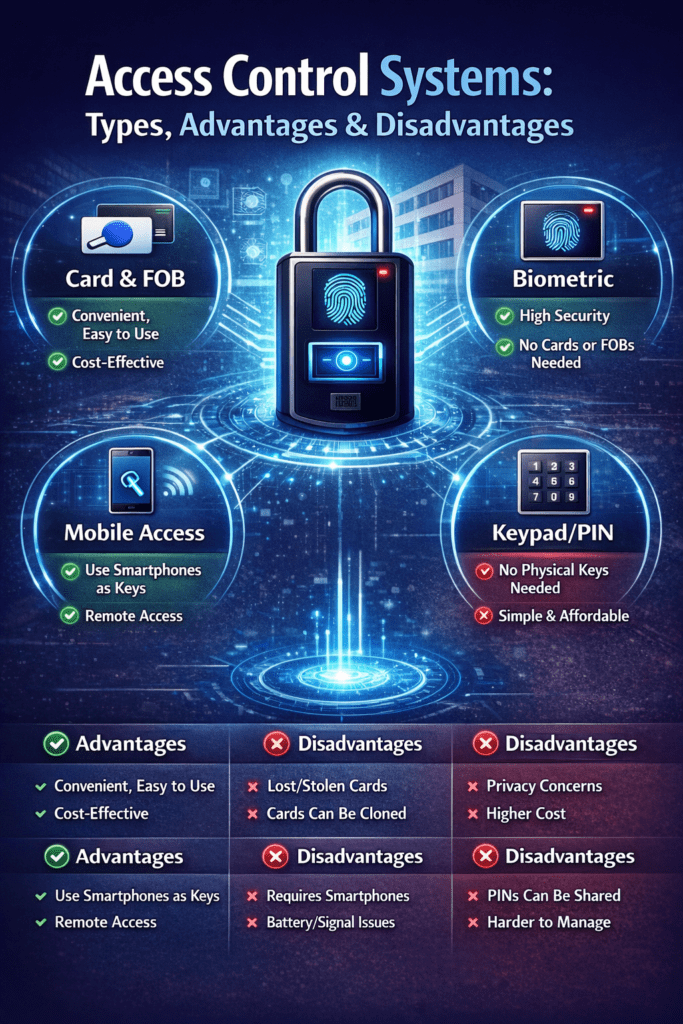
In today’s world, the term security isn’t just about locks and keys — it’s about intelligent systems that control who enters, when they enter, and how access decisions are made. With rising data theft, workforce inefficiencies, and regulatory scrutiny, businesses and institutions are turning to advanced access control systems to protect their physical spaces and digital assets.
In this blog, we’ll explore the types of access control systems, compare their strengths and challenges, and show how advanced options like those offered by Nialabs’ AI-powered biometric systems are revolutionizing access management across industries.
What Is an Access Control System?
An access control system is any combination of hardware and software that regulates who can enter a space, use a device, or access information. It replaces traditional locks with automated, intelligent mechanisms — such as biometric recognition, RFID credentials, PINs, or cloud-managed permissions — that can be configured to meet precise security requirements.
At its core, an access control system consists of:
- Credential storage and verification (face templates, fingerprints, smart cards)
- Authentication hardware (readers, biometric terminals, sensors)
- Control logic and software (policy enforcement, audit trails)
- User management tools for administrators
Together, these components ensure that the right individuals have access at the right time — and nobody else does.
Types of Access Control Systems
Access control may take many forms — from traditional mechanical systems to cutting-edge biometric platforms. Here’s a breakdown of the most commonly used models:
1. Discretionary Access Control (DAC)
Overview:
This is one of the simplest models. Access decisions are made by the owner of a resource, who decides who gets permission.
Strengths:
- Easy to implement
- Flexible for small setups
Limitations:
- Security can be weak when hundreds of users are involved
- Misconfigurations easily lead to unauthorized access
Best for: Small businesses, home labs, or personal systems.
2. Mandatory Access Control (MAC)
Overview:
Used in highly secure environments, MAC governs access through strict policies defined by a central authority not individual users.
Strengths:
- Very high security levels
- Consistent enforcement of access policies
Limitations:
- Inflexible for dynamic team changes
- Complex to administer
Best for: Military institutions, government agencies, high-security data centers.
3. Role-Based Access Control (RBAC)
Overview:
RBAC assigns permissions based on roles within an organization Users inherit access rights according to their job functions.
Strengths:
- Scales well with organizational size
- Reduces administrative errors
Limitations:
- Needs regular updates as roles change
- Initial setup can be time-intensive
Best for: Medium to large enterprises.
4. Rule-Based Access Control
Overview:
Access is governed by dynamic rules — such as time of day, physical location, or device used.
Strengths:
- Highly automated
- Ideal for compliance-heavy industries
Limitations:
- Rules can conflict or overlap
- Requires constant monitoring
Best for: Banks, regulated facilities, healthcare.
5. Physical Access Control Systems
Overview:
These focus on physical entry points — doors, turnstiles, buildings — using technologies such as RFID cards, NFC tags, or biometric scanners to grant entry.
Strengths:
- Visible deterrent to unauthorized entry
- Easy to enforce at gate and door levels
Limitations:
- Hardware costs
- Ongoing maintenance
Best for: Schools, corporate campuses, factories.
6. Logical Access Control Systems
Overview:
Logical access controls govern digital resources — networks, databases, servers.
Strengths:
- Protects digital assets
- Centralized policy control
Limitations:
- Vulnerable if network security is lax
- Requires IT expertise
Best for: IT systems, enterprise software management.
7. Biometric and Cloud-Driven Access Control
Overview:
The most modern model uses biological features (like face or fingerprint) to authenticate users. Cloud connectivity enables real-time monitoring, remote management, and integration with other systems.
Example:
Devices like the N-AI09 and N-AI06 Dynamic Face Recognition Terminals from Nialabs combine touchless biometric detection with cloud connectivity to govern secure access and attendance in less than a second. These systems support multiple authentication modes — including face recognition, fingerprint, RFID, QR codes, and PINs — along with anti-spoofing protections to prevent fake identity breaches.
Strengths:
- High accuracy and fraud resistance
- Scales seamlessly across branches and sites
- Integrates with payroll, HRMS, and security dashboards
Limitations:
- Requires IT setup and training
- Higher upfront cost than basic systems
Best for: Schools, offices, factories, hospitals, large enterprises.
Comparing Access Control Systems
To help you visualize how choices stack up, here’s a comparison table summarizing key criteria:
| Access Control Type | Security Level | Flexibility | Cost | Ease of Management | Ideal Use Cases |
| DAC | Low | High | Low | Easy | Small systems |
| MAC | Very High | Low | High | Complex | Government, defense |
| RBAC | High | Medium | Medium | Moderate | Enterprises |
| Rule-Based | High | Medium | Medium | Moderate | Compliance facilities |
| Physical | Medium | Medium | Medium | Moderate | Campuses, factories |
| Logical | Medium–High | Medium | Medium | Moderate | IT systems |
| Biometric/Cloud | Very High | High | High | Moderate | Large teams, secure sites |
Key Advantages of Access Control Systems
Across industries, access control systems — especially those powered by biometric and cloud intelligence — offer transformational benefits:
1. Enhanced Security & Fraud Prevention
Biometric systems eliminate shared passwords and stolen cards. Instead, they verify identity based on unique physical traits, making unauthorized access extremely difficult.
2. Real-Time Monitoring & Audit Trails
Cloud-connected systems update logs instantly, enabling administrators to see who accessed which areas and when — from anywhere. This is essential for compliance audits and security investigations.
3. Operational Efficiency
Replacing manual processes with automation reduces administrative workload. For example, schools using biometric attendance and access systems from Nialabs have reported reduced manual tracking errors and time savings on payroll and attendance management.
4. Scalable Across Locations
Cloud integration allows easy rollout across multiple offices, campuses, or facilities, maintaining centralized control.
5. Integrates with Existing Systems
Modern access control supports APIs and integrations with HR, payroll, and ERP tools, streamlining operations and reducing data silos.
Disadvantages and Challenges
No technology is perfect. Here are some challenges to consider:
1. Higher Initial Cost
Advanced biometric and cloud systems require investment in hardware, software, and network infrastructure.
2. Technical Complexity
Organizations may need IT support for setup, updates, and maintenance.
3. Privacy Concerns
Biometric data is highly sensitive and must be stored and processed in compliance with privacy regulations.
4. System Dependency
Cloud systems depend on internet connectivity — a network outage can affect access operations if not backed by offline capabilities.
How to Choose the Right System
Selecting the right access control solution depends on your needs:
- Security Requirements – Higher security needs call for biometric or MAC systems.
- Scale & Flexibility – Growing organizations benefit from cloud-connected and role-based access models.
- Budget & Support – Smaller businesses may start with card or NFC-based systems and upgrade over time.
- Integration Needs – If you need attendance, payroll, and security unified, choose systems that support APIs and automation.
Why Modern Businesses Are Choosing Biometric Access Control
In the digital age, modern access control systems do much more than grant entry:
- They reduce time fraud and buddy punching
- They provide accurate workforce analytics
- They protect against identity spoofing
- They offer remote monitoring and management
- They unify security and HR workflows
For example, organizations using high-accuracy biometric terminals from Nialabs — with features like anti-spoofing, long-range face recognition, mask detection, and cloud-based reporting — are realizing improved punctuality, greater accountability, and streamlined operations.
Frequently Asked Questions (FAQ)
Q1. What is the most secure access control system?
Biometric and cloud-managed systems generally provide the highest security, especially when combined with multi-factor authentication.
Q2. Are biometric systems safe for privacy?
Yes — as long as they follow data protection standards and encryption best practices.
Q3. Can access control systems integrate with existing software?
Yes — modern solutions provide APIs and SDKs to sync with HR, payroll, and management platforms.
Q4. Do biometric systems work in low light or crowded environments?
Advanced models like those from Nialabs use dual infrared and RGB cameras to maintain accuracy even in difficult conditions.
Q5. Are access control systems worth the investment?
For most organizations, the benefits enhanced security, reduced fraud, and operational efficiency outweigh the costs.
Conclusion
Access control systems have evolved far beyond simple locks and keys. From discretionary and rule-based models to cutting-edge biometric and cloud-connected platforms, today’s solutions offer unmatched security, scalability, and operational value.
Whether you’re managing a small office, a school campus, or a multi-site enterprise, choosing the right access control system can transform your security posture and streamline operations. Solutions from providers like Nialabs help organizations harness AI-powered accuracy, real-time data, and flexible integrations — delivering a future-ready approach to access and attendance management.