Introduction
The R6 Marketplace in Rainbow Six Siege has transformed how players interact with the game’s cosmetic items. It’s not just a place to buy and sell skins—it’s a hub where strategy, timing, and understanding market trends can give you a real advantage. Whether you want to acquire rare weapon skins, unique operator uniforms, or trade items for R6 Credits, mastering the marketplace is essential. Many players dive in without knowing the rules, risking losses or missing opportunities.
This guide will break down every key aspect of the R6 Marketplace, from navigating the interface to setting the best prices for buying and selling. We’ll cover tips to avoid common mistakes, manage transactions efficiently, and maximize your in-game profits. By the end, you’ll have the confidence and knowledge to use the R6 Marketplace like a pro, saving time and R6 Credits while getting the items you truly want.
Understanding the R6 Marketplace
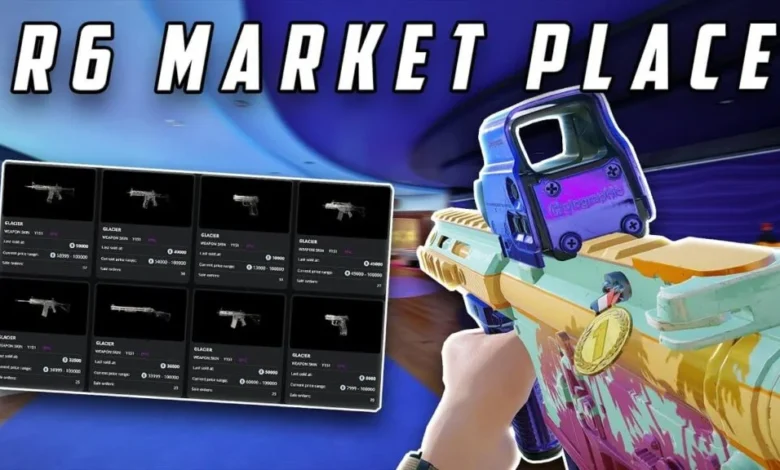
The R6 Marketplace is a trading system where players can buy and sell in-game cosmetic items using R6 Credits. It is designed to provide a safe, official way to trade skins, charms, and operator outfits. To participate, players must meet eligibility criteria, such as reaching a minimum level in the game and securing their Ubisoft account with Two-Factor Authentication. Items are displayed with their current market price, and players can place purchase or sale orders to match with other users automatically.
How to Navigate the Marketplace
- Accessing the Marketplace
Open Rainbow Six Siege and navigate to the marketplace section in the main menu. You can browse items by category, rarity, or search for a specific item. - Understanding Listings
Each item shows the current price, quantity available, and historical sales data. This helps you make informed decisions about buying or selling.
Buying Items
- Placing an Order
Select the item you want and enter the maximum amount of R6 Credits you are willing to spend. The marketplace system searches for sellers matching your price. - Transaction Completion
Once a match is found, the item is automatically added to your inventory. Orders not matched within a specific period expire, so timing can be crucial for rare items.
Selling Items
- Listing Your Items
Go to the ‘Sell’ section, choose the item from your inventory, and set a competitive price in R6 Credits. - Transaction Fees
A 10% fee is deducted from every sale. This means a 100-credit sale nets 90 credits. Understanding this helps you set realistic prices.
Tips for Successful Trading
- Research Market Prices: Compare current listings before pricing your items.
- Set Competitive Prices: Avoid overpricing rare items or undervaluing common ones.
- Be Patient: Some items, especially rare ones, take time to sell.
- Use Official Channels: Stick to the official marketplace to prevent scams.
- Track Trends: Market trends can change based on season updates or events.
Common Issues and How to Solve Them
- Item Not Appearing: Some items are not tradable immediately after acquisition. Waiting until they become tradable solves this.
- Order Not Matching: Adjust your price or wait for new listings to appear.
- Confusion About Fees: Always calculate the 10% deduction when setting sale prices.
Read More: Tomleonessa679: Exploring the Digital Persona Captivating 2025
Conclusion
The R6 Marketplace is more than just a trading platform; it’s an opportunity for players to strategically enhance their Rainbow Six Siege experience. By understanding its mechanics, players can buy rare skins, sell unwanted items, and manage their R6 Credits efficiently. Success in the marketplace relies on knowing how to set competitive prices, monitor trends, and use the system’s features wisely.
Patience and market awareness are key—rushing transactions or ignoring price trends can lead to losses. Additionally, always prioritize safety by using official channels, ensuring your account is secure, and avoiding unverified trading offers. Mastering the R6 Marketplace not only improves your inventory but also gives you a strategic edge in the game. With consistent practice and careful decision-making, you can make the most of every trading opportunity and enjoy a richer, more rewarding Rainbow Six Siege experience.
FAQs
- How do I access the R6 Marketplace?
Open Rainbow Six Siege, navigate to the marketplace section in the main menu, and log in to your account. - Which items can I trade?
You can trade weapon skins, charms, and operator uniforms. Some items are not immediately tradable. - Is there a fee for selling items?
Yes, a 10% fee is deducted from every sale, reducing the total credits you receive. - Can I cancel an order?
Yes, before it is completed. Once matched and fulfilled, orders cannot be canceled. - Why isn’t my item showing in the marketplace?
Items from the current season or certain events may have restrictions and become tradable later.