Introduction
Google Block Breaker is a hidden gem that brings the retro excitement of arcade gaming directly into your browser. It’s Google’s take on the classic “Breakout” style, where you use a paddle to bounce a ball and break colorful blocks until the screen is cleared. Unlike traditional downloads or apps, you don’t need to install anything—just search for it, click, and play. Simple controls, rewarding power-ups, and increasingly fast levels make it an addictive escape during work breaks or downtime.
This Easter egg also taps into nostalgia, reminding players of Atari’s original Breakout game while adding Google’s signature playful spin. Whether you’re on desktop or mobile, it’s a free game that combines easy accessibility with satisfying gameplay. In this guide, we’ll explain what Google Block Breaker is, how to play it, expert strategies, and why it has become a favorite time-killer for casual gamers worldwide.
What Is Google Block Breaker?
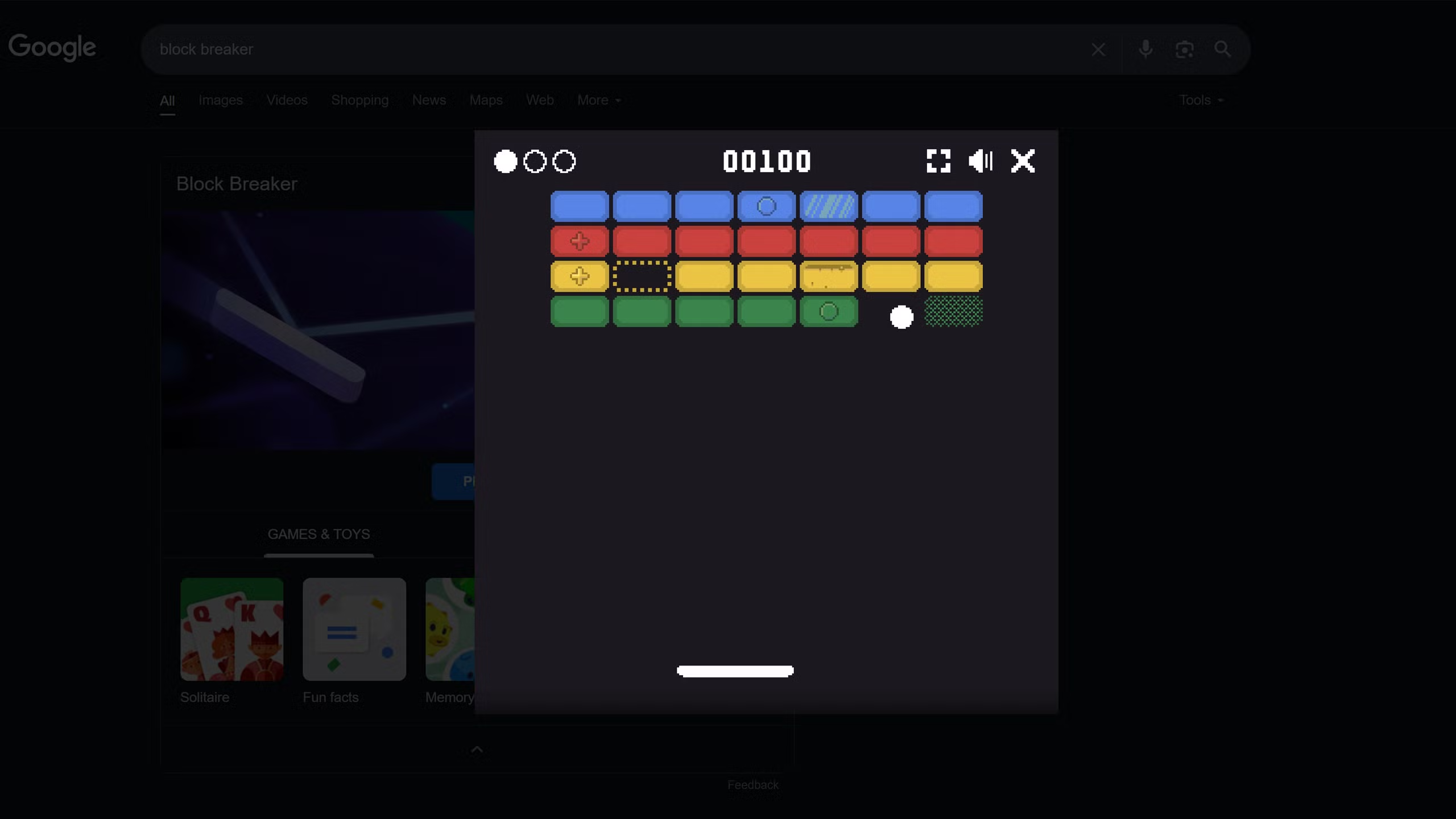
Google Block Breaker is a browser-based arcade game designed as an Easter egg within Google Search. It reimagines the timeless brick-breaker concept—your paddle moves at the bottom of the screen, bouncing a ball upward to destroy colored bricks arranged in various patterns. Clear the layout, and you progress to the next level.
The game pays homage to Atari Breakout from the late 1970s, but with a modern polish. Bright visuals, smoother controls, and extra mechanics like power-ups give it a contemporary edge while preserving that old-school charm.
Unlike many online games, there’s no login, app, or installation. Simply searching “Google Block Breaker” unlocks it instantly. This accessibility makes it both nostalgic and modern—perfect for quick play sessions when you want a fun distraction without commitment.
How to Play Google Block Breaker
Getting started with Google Block Breaker is simple:
- Open Google on your desktop or mobile browser.
- Type “Block Breaker” or “Google Block Breaker” into the search bar.
- A game tile will appear at the top of search results. Click “Play.”
- Use your controls (arrow keys, mouse, or touch screen swipes) to move the paddle.
- Bounce the ball, smash the bricks, and try to clear the level before the ball drops past the paddle.
The core idea is easy to understand but becomes increasingly challenging as the speed ramps up and the layouts grow more complex.
Gameplay Mechanics & Features
While rooted in a simple concept, Google Block Breaker introduces fresh mechanics that keep players hooked:
- Power-Ups
Collect falling items that expand your paddle, multiply balls, or add laser shots to blast through bricks. - Varied Bricks
Some bricks shatter in one hit, while others require multiple strikes or remain indestructible, forcing strategic angles. - Increasing Difficulty
Each level introduces faster ball speeds and trickier brick formations, testing your reflexes. - Score System
Points increase with every brick destroyed. Combo streaks and multi-ball clears boost your totals. - Instant Restart
Lose all your balls? No problem—restart in seconds and aim for a better score.
These elements combine retro charm with modern replayability, making every round different and exciting.
Strategies to Master Google Block Breaker
1. Perfect Paddle Control
The paddle is your lifeline. Small, precise movements keep you aligned under the ball. Striking with the edges creates sharper angles, which help reach bricks tucked away in corners.
2. Use Power-Ups Wisely
Not all power-ups should be grabbed instantly. For example:
- Paddle expansion is great for tricky fast levels.
- Multi-ball clears layouts faster but requires quick reflexes.
- Laser shots are best saved for stubborn rows.
3. Work the Angles
Directing the ball at steep angles helps it bounce across the top of the screen, clearing bricks without constant paddle returns.
4. Study Block Layouts
Some levels feature bricks arranged to funnel the ball in specific directions. Aim for weak points early to spark chain reactions.
5. Stay Composed at High Speeds
When the ball accelerates, it’s easy to panic. Staying calm and anticipating where it will land improves consistency and keeps you in control.
Why Google Block Breaker Is So Addictive
Several factors make this simple game unexpectedly hard to quit:
- Nostalgia Factor: It taps into retro arcade roots while looking modern.
- Quick Accessibility: No installation—just search and play instantly.
- Casual Yet Competitive: Easy enough for beginners but challenging for high-score chasers.
- Hidden Surprise: As an Easter egg, discovering it feels rewarding in itself.
- Short Play Bursts: Each round lasts only a few minutes, making it perfect for work breaks or mobile play.
This blend of simplicity and depth is what keeps players returning for “just one more round.”
LSI Keywords Integrated Naturally
Throughout this article, terms like retro arcade game, brick-breaker doodle, play directly in Google search, Atari Breakout inspiration, browser Easter egg, paddle game, free online mini-game, and nostalgic time-killer help capture related queries while keeping the flow natural for readers.
FAQs
1. How do I play Google Block Breaker?
Search for “Google Block Breaker” on Google, click the game tile, and use your keyboard, mouse, or touchscreen to control the paddle and break bricks.
2. Can I play Google Block Breaker on mobile?
Yes, it’s fully compatible with smartphones and tablets. Swipe your finger across the screen to move the paddle.
3. Are there power-ups in the game?
Yes. Power-ups such as paddle extensions, lasers, and multi-ball make the gameplay more dynamic and help you clear levels faster.
4. Why doesn’t Google Block Breaker appear for me?
Sometimes the Easter egg is temporarily unavailable. If it doesn’t appear, try refreshing or checking back later.
5. Is Google Block Breaker free?
Absolutely—it’s a completely free game built into Google Search with no downloads or hidden costs.
Read More: Get Ready Bell Client Pulse Real-Time Client Engagement Tool
Conclusion
Google Block Breaker is more than just a hidden doodle—it’s proof that the simplest ideas can deliver endless entertainment. This playful Easter egg combines the nostalgic spirit of 1970s arcade classics with the convenience of modern browsers. By searching a single phrase, you unlock an engaging mini-game that challenges reflexes, sharpens focus, and offers bursts of fun in just a few minutes.
With its balance of power-ups, speed progression, and intuitive design, it’s a game that appeals to both casual players and high-score enthusiasts. The fact that it’s accessible on both desktop and mobile makes it even more versatile. Whether you’re reliving old gaming memories or discovering the charm of brick-breaker for the first time, Google Block Breaker proves that good gameplay never goes out of style. Next time you need a quick break, type “block breaker” into Google and let the fun begin.